
BarBack - Cocktail Assistant
Linkrulz SoftwareFood & Drink
3.890.00 Reviews
- Version
- 4.0.3
- Installs
- 50.00K
- Age Rating
- Everyone
Screenshots
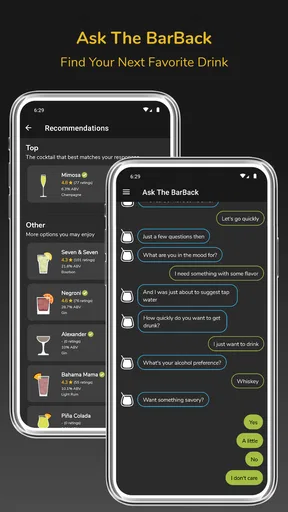
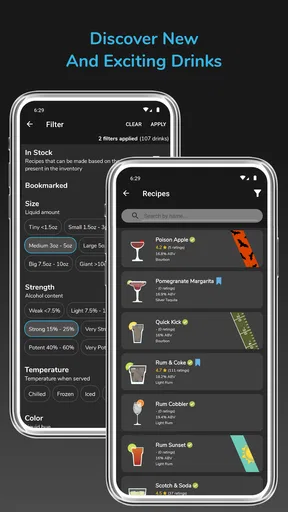
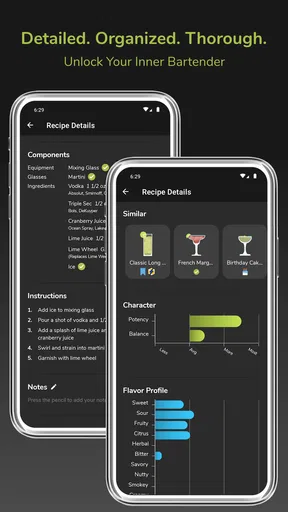
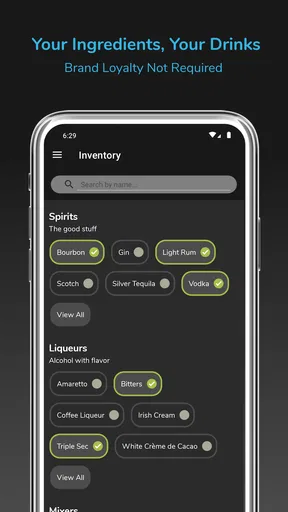
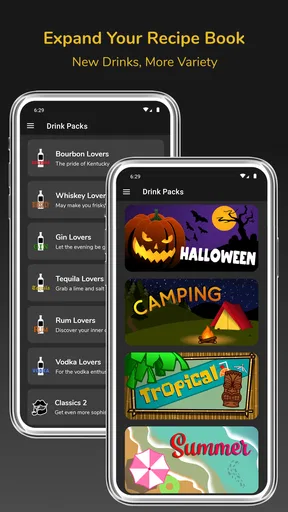
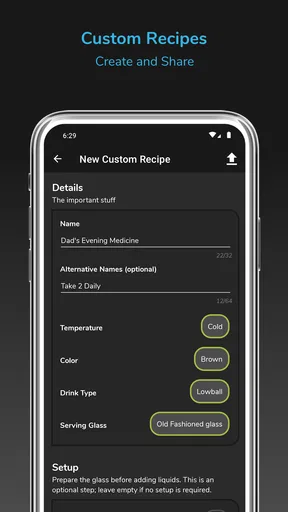
Our Review of BarBack - Cocktail Assistant
 Analysis by Appyee
I approached BarBack as a practical food-and-drink companion rather than another recipe collection. Its focus is narrower and more useful for a particular moment: helping me think through cocktails while I am standing in a kitchen, hosting friends, or trying to make sensible choices during an evening out. That makes it interesting, but it also means its value depends heavily on how comfortably I can read and operate it in a busy, distracting setting.
Developed by Linkrulz Software, this free app is presented as a pocket drinking assistant for Android and iOS users. It is suitable for Everyone, runs on operating system version 11 or later, and includes optional in-app purchases priced at $0.99 per item. The current version is 4.0.3. I would not treat those details as the reason to install it, though. The real question is whether its cocktail-oriented approach fits the way you drink, plan, and navigate information.
How BarBack feels when I use it
I find the best way to approach the app is as a focused aid for choosing and preparing cocktails, not as something I need to keep tapping while mixing. That distinction shapes the practical workflow: I can make decisions before the counter gets busy, then move on to the ingredients. Next, I’ll look at how that advance planning works in an ordinary hosting situation.
Readability and navigation in an everyday setting
The strongest way to judge a cocktail assistant is not from a quiet desk but from a real preparation moment. Imagine a small kitchen, a phone resting near the cutting board, several bottles on the counter, and guests asking what is available. In that situation, an app needs to let me find useful information without making me remember a complicated route through menus. BarBack makes the most sense when I use it as a quick reference: I decide what kind of drink I want, check the relevant guidance, and return to the ingredients in front of me.
That workflow is more approachable than searching the web for a recipe and then sorting through long articles, personal stories, advertisements, and unrelated suggestions. A general search engine offers breadth, but it also makes me do the filtering. BarBack’s dedicated cocktail purpose gives it a clearer starting point for someone who wants drink-related help without browsing a whole food platform.
At the same time, a focused app is not automatically easier for everyone. People with low vision, reading difficulties, or attention limitations may need strong contrast, generous text, predictable controls, and clear hierarchy. I found that the app is most comfortable when I slow down enough to read the screen before beginning a task. That is fine in a calm setting, but it can become less convenient when I am switching between the phone and a crowded counter.
My practical advice is to explore the app before hosting rather than opening it for the first time when guests arrive. Identify the parts you expect to use, prepare the phone at a comfortable viewing angle, and avoid placing it beside splashing liquids. This small amount of preparation reduces the need for repeated searching and makes the experience less dependent on quick visual scanning.
The app also benefits from a simple mental model. I use it to narrow a choice, check a drink direction, and support a decision. I do not expect it to replace my own judgment about taste, available equipment, or the needs of the people I am serving. That distinction matters because a cocktail assistant can organize information, but it cannot see whether a bottle is nearly empty or whether a guest needs a non-alcoholic alternative.
Motor and sensory considerations behind the counter
Using a phone while preparing drinks creates physical problems that do not appear in a normal app review. My hands may be wet, occupied, or sticky. I may be holding a shaker, measuring liquid, or trying not to touch the screen after handling citrus. BarBack is therefore easiest to use in short stages: read first, put the phone down, prepare the ingredients, then check the next point when my hands are free.
That stop-and-start method is especially useful for people with limited dexterity or tremors. It avoids demanding constant tapping while a drink is being assembled. I would still keep the device on a stable surface and enlarge the surrounding workspace rather than trying to hold it in one hand. If reaching small controls is uncomfortable, the app may feel more demanding than a printed recipe card or a spoken instruction from another person.
For users with hearing loss, a text-based reference can be preferable to relying on someone explaining a recipe verbally in a noisy room. That is one of the app’s natural strengths as a written tool. Conversely, someone with dyslexia or cognitive fatigue may find dense reading tiring, particularly if they are comparing several drink options at once. In that case, choosing one drink before opening the app is more manageable than browsing without a plan.
People with light sensitivity or visual stress should pay attention to the phone’s own display settings and the room lighting. I would avoid using a very bright screen in a dark room, both for comfort and because glare can make text harder to distinguish. The app should be treated as one part of the setup; the phone’s text size, display contrast, and screen orientation may have as much effect on usability as the app itself.
There is also a social sensory angle. A busy gathering involves music, conversation, movement, and pressure to answer quickly. BarBack is better suited to quiet preparation or a deliberate choice than to rapid-fire requests from several people. I get more from it when I use it before the social moment, then rely on the result instead of repeatedly consulting the screen.
Situational access: who benefits most
I can see the clearest benefit for a beginner who wants a dedicated cocktail guide without committing to a paid service. The free entry point makes it easy to try, while the optional purchases allow the app to offer extra material without making the basic decision feel like a major investment. The purchase model is worth remembering, however: individual items cost $0.99, so anyone who dislikes incremental spending should check what is useful before buying several additions.
It is also a sensible companion for someone with a small home bar. Instead of starting with an ambitious shopping list, I can look at what I already have and use the app to decide whether a drink is realistic. This is a better use of a cocktail assistant than chasing recipes that require unusual ingredients. The trade-off is that the app cannot make missing bottles appear, so I still need to adapt responsibly when my cupboard does not match the suggested direction.
For a host with limited mobility, the main advantage is planning. I can review options while seated, decide which ingredients need to be placed within reach, and reduce unnecessary trips between the counter and storage. A useful workflow is to select a small set of drinks in advance, arrange the bottles in the order I expect to use them, and keep water and basic tools nearby. The app supports that preparation, even though the physical setup remains my responsibility.
For someone who wants a sober or alcohol-free experience, I would be more cautious. The app is centered on drinking and cocktails, so it is not the first tool I would choose for a household where alcohol-free recipes, health restrictions, or recovery-friendly planning are the primary concern. It may still be useful as a source of ideas that I adapt, but a dedicated alcohol-free recipe app or a carefully curated cookbook would likely offer a better match.
Travel is another mixed case. A pocket reference is convenient when I am away from my own shelves, but its usefulness depends on what I can actually buy and prepare at the destination. I would use it to inspire a simple choice, not to plan an elaborate drink around ingredients that may be unavailable. For users with unreliable connectivity or limited data access, I would test the parts I need before leaving home rather than assuming every reference will be available at the right moment.
Three small workflow improvements I found useful
First, I separate discovery from execution. I browse when my hands are clean and free, choose the drink, and only then start measuring. This is more accessible for anyone who finds multitasking difficult, and it also protects the phone from spills. It turns the app from a constantly handled tool into a planning aid.
Second, I use the app to reduce choices rather than increase them. A long list can be tiring, especially for someone dealing with visual overload or decision fatigue. Picking one drink style and one backup option gives me a clear path. If guests have different tastes, I ask about preferences before opening the app, then use those answers to guide the search.
Third, I make the physical environment do some of the accessibility work. A stand or stable support improves viewing and reduces hand strain. A bright but indirect lamp can help with reading. Ingredients placed in a logical sequence reduce reaching and memory demands. None of these changes is a BarBack feature, but they make its information more usable in practice.
These workflows reveal an important trade-off. The app is more helpful when I prepare, but preparation removes some of the spontaneity that makes cocktail-making enjoyable. Someone who wants instant, hands-free guidance may prefer a voice assistant, a large-format cookbook, or another tool designed around spoken instructions. BarBack is better for a person who is comfortable checking a screen briefly and then working independently.
Remaining barriers and honest limitations
The most obvious limitation is context. A cocktail reference is not automatically a complete hosting assistant, a nutrition guide, or a safety system. I still need to think about allergies, medication interactions, alcohol tolerance, responsible serving, and whether a guest wants to drink at all. The app can help me choose a beverage, but it should not be treated as medical or personal advice.
The free price is welcoming, but optional purchases can complicate the experience for users who prefer one clear cost. At $0.99 per item, a single addition may feel reasonable, yet several small purchases can change the overall value. I would start with the free experience and only pay for something that solves a specific need rather than buying out of curiosity.
Device compatibility also deserves attention. The minimum operating system requirement is version 11, which keeps the app away from older devices. For people who rely on an older phone because it is familiar, affordable, or easier to hold, that requirement can be a genuine barrier. Anyone sharing a household device should also remember that a phone used around drinks needs protection from moisture and accidental knocks.
The app’s public reception is respectable but not flawless: it sits at a 3.8 average from roughly 338 ratings, with about 90 written reviews and more than 50 thousand installs. I read that as a sign of a useful niche product rather than a universally polished solution. The audience is large enough to show that the concept connects with people, but the rating also supports my advice to try the basic experience yourself before paying for additions.
Another limitation is the gap between digital instructions and physical ability. A recipe may be easy to read but difficult to execute if measuring, shaking, opening bottles, or reaching a shelf is painful. Users with motor disabilities may need another person, adapted tools, or a pre-arranged workstation. BarBack can reduce planning effort, but it cannot remove the physical demands of cocktail preparation.
There is a similar gap for people with cognitive disabilities. A focused drink assistant may be less overwhelming than a general web search, yet alcohol-related decisions still require care. I would recommend using it with a trusted person when the user needs help judging quantities, ingredients, or whether a drink is appropriate. Clear routines and a limited selection are safer than experimenting with many options at once.
Who should install it, and who should choose something else?
I would recommend trying BarBack if you want a free, specialized cocktail companion, enjoy making decisions from ingredients you already own, and are comfortable reading from a phone during preparation. It is particularly appealing to casual hosts, beginners, and people who want more structure than a random internet search provides without moving to a full bar-management system.
I would look elsewhere if your priority is hands-free operation, detailed dietary filtering, alcohol-free living, professional inventory management, or comprehensive accessibility controls. A printed guide may be better for someone who cannot safely handle a phone near liquids. A voice-first tool may suit someone with limited vision or dexterity. A specialist alcohol-free resource may be more appropriate for someone avoiding alcohol altogether.
That comparison is not a rejection of the app; it clarifies its boundaries. BarBack occupies the middle ground between a search engine and a serious bar-management product. It is more focused than general browsing, but less suitable than specialized tools for users with very specific access needs. Its best experience comes from combining the app with a sensible physical setup and a clear plan.
My inclusive verdict
My overall impression is positive, with realistic expectations. BarBack gives cocktail planning a compact home, and its free availability makes experimentation low-risk. I like it most as a preparation tool: something I consult before the first bottle is opened, not something I need to operate continuously while my hands are busy.
From an inclusion perspective, its written, focused format can help people who prefer visual information, quieter preparation, or advance planning. It is less convincing for users who need large, highly adjustable controls, hands-free interaction, specialized dietary support, or minimal physical handling. Those are not minor details; they determine whether the app feels empowering or frustrating.
The developer, Linkrulz Software, has built a useful niche around the idea of a pocket drinking assistant. I would install it for a relaxed home bar, a small gathering, or a beginner-friendly cocktail session. I would first adjust my phone for comfortable reading, plan one or two drinks, and keep a non-alcoholic option available for guests. My recommendation is to use BarBack as a thoughtful planning companion, not as a substitute for personal judgment, accessible preparation, or responsible drinking.
Verdict
Strengths of BarBack - Cocktail Assistant
- Quickly suggests cocktails based on the ingredients you have.
- Useful ingredient substitutions help when your bar is missing something.
- Recipe steps are simple enough for beginners to follow.
- Saves favorite drinks for convenient access during future mixing.
- Covers classic cocktails as well as less familiar drink ideas.
Limitations of BarBack - Cocktail Assistant
- Some recipes may require premium or uncommon ingredients.
- Ingredient recognition and search can feel limited for large home bars.
- Portion guidance may need adjustment for different glass sizes.
- The app offers little help with advanced mixing techniques.
- Recipe content may not be updated consistently over time.
Similar Picks in This Category
View All
Rappi: Food Delivery, Grocery
Rappi, Inc - Delivery3.5

McDonald’s: Cupons e Delivery
Arcos Dorados4.3

Swiggy: Food Instamart Dineout
Swiggy4.7

Blinkit: Groceries & more
Blinkit4.8

foodpanda: food & groceries
Foodpanda GmbH a subsidiary of Delivery Hero SE4.0

Zomato: Food Delivery & Dining
Zomato4.7
Frequently Asked Questions
What is BarBack - Cocktail Assistant and who is it designed for?
BarBack - Cocktail Assistant is a cocktail-making companion designed to help users discover drinks, review ingredient lists, and follow preparation instructions. It can be useful for beginners who need clear guidance, as well as more experienced home bartenders looking for inspiration. Before downloading, remember that the app is primarily a recipe and organization tool, not a substitute for responsible alcohol consumption or professional bartending training.
Does BarBack - Cocktail Assistant work without an internet connection?
Offline availability can depend on the app version and the specific features you want to use. Cocktail recipes that have already been loaded or saved may remain accessible without a connection, while features such as updates, online searches, account synchronization, or external content may require internet access. It is worth opening the app while connected to check which recipes are available offline before relying on it at a party or event.
Can BarBack help me find cocktails based on the ingredients I already have?
One of the most useful reasons to try a cocktail assistant is the ability to explore recipes according to available spirits, mixers, garnishes, and bar equipment. BarBack may help narrow down suitable drink ideas, but users should still check every recipe carefully because ingredient names, measurements, substitutions, and serving styles can vary. If your home bar is limited, some suggested cocktails may require additional purchases.
Is BarBack - Cocktail Assistant free to download, and does it include in-app purchases?
The download price and available features may vary between the Android and iOS versions, as well as between different app updates. Some functions may be offered for free, while premium content, advanced tools, advertising removal, or additional recipe collections could require payment. Check the current store listing before installing and review any subscription terms carefully, especially the renewal conditions and cancellation process.
Does the app provide reliable measurements and instructions for making cocktails?
BarBack can be a convenient reference for cocktail recipes, but users should treat its instructions as guidance rather than an absolute standard. Cocktail measurements and techniques can differ between regions and bartenders, and the final taste depends on the ingredients, ice, glassware, and equipment used. Always read the complete recipe, measure responsibly, and avoid serving alcohol to anyone under the legal drinking age.
